Product description
Perpetual licence, no subscription
Microsoft Office 2024
Office 2024 is the current version of Microsoft's office suite, bought once and used without monthly fees. Depending on the edition, you get the classic Word, Excel, PowerPoint and OneNote apps; Office Home & Business 2024 adds Outlook, and Office LTSC Professional Plus 2024 also includes Access. Microsoft provides security updates for it until October 2029.
Word 2024
If Word closes unexpectedly, it reopens the documents you were working on the next time you start it. You can also give comments a Like reaction.
Excel 2024
14 new text and array functions, the IMAGE function for pictures right inside cells, and charts that expand automatically with dynamic arrays.
PowerPoint 2024
Cameo puts your live camera feed directly on a slide, and Recording Studio records your presentation with voice, ink and video and exports it as a video file.
Outlook 2024
Better search across email, attachments, calendar and contacts, plus the option to shorten meetings automatically. Included in Home & Business and the LTSC editions.
No subscription
Pay once and the apps are installed on your computer. Office 2024 no longer gets new features, only security and quality updates.
OpenDocument 1.4
Word, Excel and PowerPoint support the ODF 1.4 format, including tables within shapes and lists starting at zero.
Key features
Everything Microsoft Office 2024 can do.
Office Home 2024: Word, Excel, PowerPoint and OneNote for home and school use
Office Home & Business 2024: adds Outlook and is intended for work and small businesses too
Office LTSC Professional Plus 2024: Word, Excel, PowerPoint, Outlook, OneNote and Access for Windows
Home and Home & Business editions run on a PC or Mac
New default Office theme, consistent across all apps
Faster Excel when several workbooks are open
Closed captions for video and audio in PowerPoint
Support for VBA macros
32-bit and 64-bit versions for Windows
Security and quality updates until 9 October 2029
Fully localised in English, Czech, Slovak, Polish and Hungarian
System requirements
Where you can run Microsoft Office 2024.
Windows
Windows 11 or Windows 10 (on Windows 10, Office LTSC 2024 supports only the LTSC 2019 and 2021 editions), 1.1 GHz dual-core processor, 4 GB RAM, 4 GB free disk space, 1280 × 768 display, internet connection for activation.
macOS
One of the three most recent versions of macOS, Intel or Apple silicon processor, 4 GB RAM, 10 GB free disk space (Home and Home & Business editions).
How it works
1.
Order
Choose the number of devices and licence length and pay securely online.
2.
Key by e-mail
Your licence key usually arrives within a few minutes.
3.
Activate
Download the app from the vendor's official website and enter the key – see the Instructions tab.
Frequently asked questions
What is the difference between the Office 2024 editions?
Office Home 2024 includes Word, Excel, PowerPoint and OneNote for home and school. Office Home & Business 2024 adds Outlook and can also be used for work. Office LTSC Professional Plus 2024 and Standard 2024 are volume-licensed editions for Windows; Professional Plus also includes Access.
On how many devices can I use Office?
The licence covers installation on one computer (one PC or Mac for the Home editions). The exact licence type, for example whether it is linked to a Microsoft account, is listed in the parameters of the variant you choose.
When does the licence start and when does it expire?
The licence is perpetual: it does not expire and there is no subscription. Microsoft provides security updates for Office 2024 until October 2029; no new features are added and moving to the next version requires a new licence.
Do I need an internet connection?
The Home editions need the internet to redeem the key, activate, receive updates and periodically confirm activation. Office LTSC 2024 can be installed offline once the installation files have been downloaded; MAK activation is done online or by telephone.
Which languages is Office 2024 available in?
Office 2024 is fully localised in English, Czech, Slovak, Polish, Hungarian and many other languages. You choose the language during installation and can add more later as language packs.
How does it differ from Microsoft 365?
Microsoft 365 is a subscription with continuously updated apps for multiple devices, including phones and tablets, and 1 TB of cloud storage. With Office 2024 you pay once, the apps run on one computer and no cloud services are included.
Instant delivery
Key by e-mail within minutes
Guarantee of legality
Verified licences
Secure payment
Your data protected
Free gift
With every order
Product instructions
1. Download the installation media to your device: Download
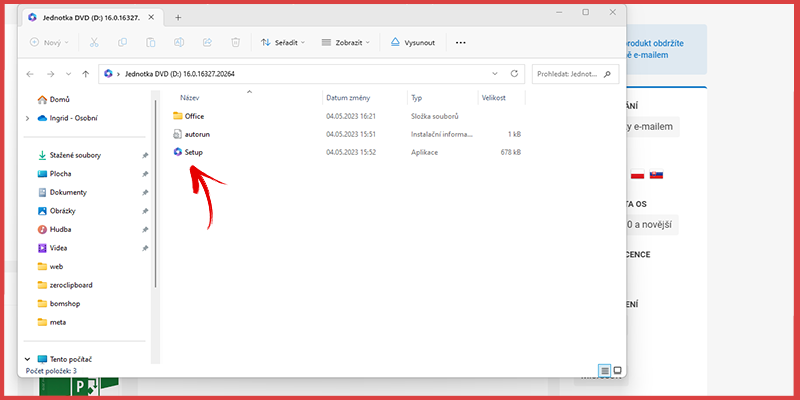
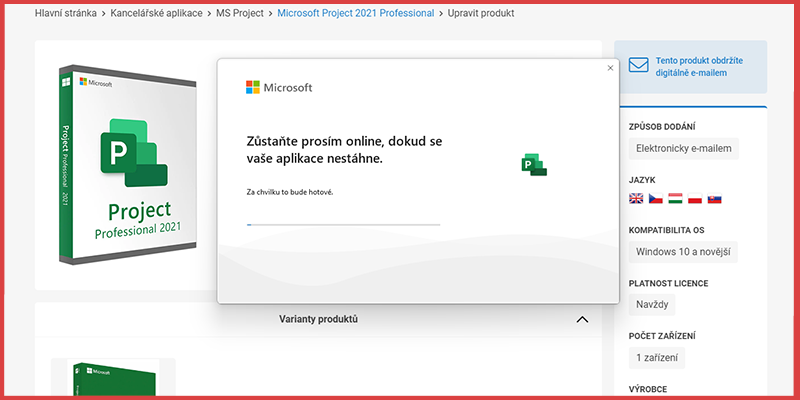
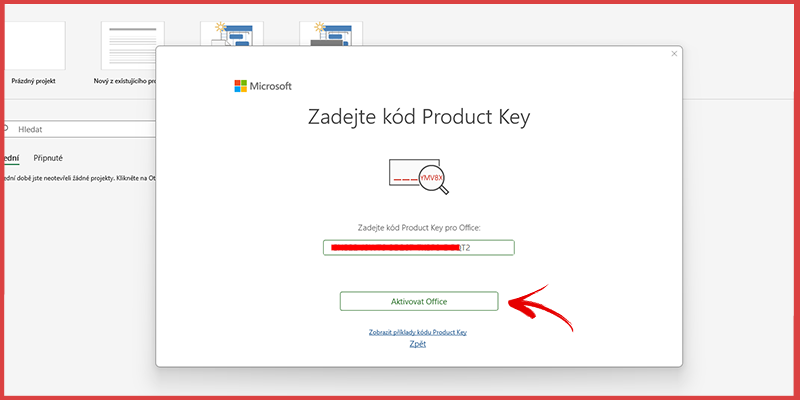
2. When the installation is complete, open an app (e.g. Word, Excel) and enter the licence key (code) you received with your order.
3. Then choose the option "I want to activate the software by telephone".
.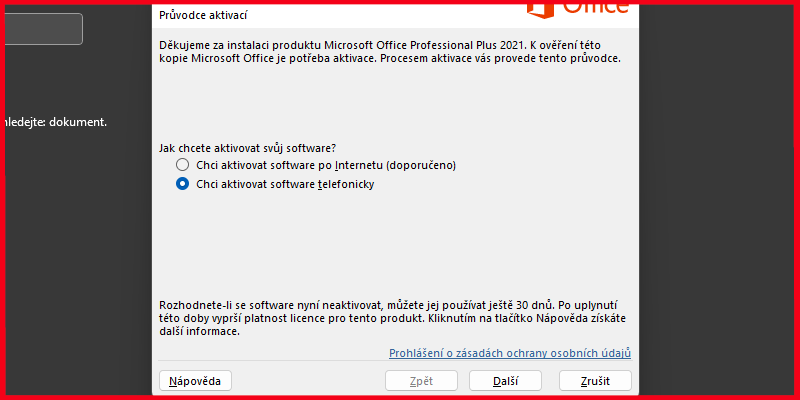
4. In the next step you will see your Installation ID (a 63-digit number split into groups of 7 digits, shown in "Step 2" in the picture).
Enter your Installation ID on this website: https://www.bomshop.eu/office-activation and generate your Confirmation ID, which you then type into the empty fields in "Step 3".
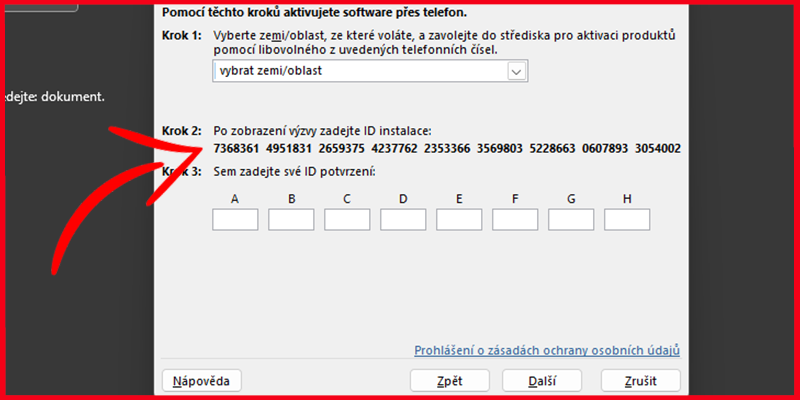
5. To generate the Confirmation IDsuccessfully, enter on the website the correct order number, the product activation key from your order that you received by e-mail, and the Installation ID from the Office app. Then click the Send button to generate the Confirmation ID. Enter it in the Office app to activate your licence.